EduPark

October 2026·12 updates

What's New: Issue 07, October 2026

New for students and schools every month

Cover story·01 / 09New

A study plan that adjusts after every session

Set your test date, target score and weekly hours, and EduPark lays out your prep week by week: lessons, practice sets and mock exams aimed at the topics where you can gain the most points. The plan adjusts after every practice set and mock exam, a calendar shows what's due each day, and your projected score updates as you go.

For students & families·

A student's study plan: now about 1260, projected 1400–1500 by the exam against a 1450 target, a month calendar with the week's practice on its days, and the Timeline's this-week agenda of practice cards, each with its expected point gain.

In this issue

Organization Settings' Export data card: the admin clicks Export data, it shows Preparing export…, and once the ZIP of spreadsheets has downloaded the card reads Last exported by her on today's date.
New

Download your organization's data as spreadsheets

Owners and admins can export everything from Org Settings as one ZIP of CSV files: students, test scores for each exam, assignments, practice and vocabulary sessions, and word mastery. A README explains every column.

For educators & schools·

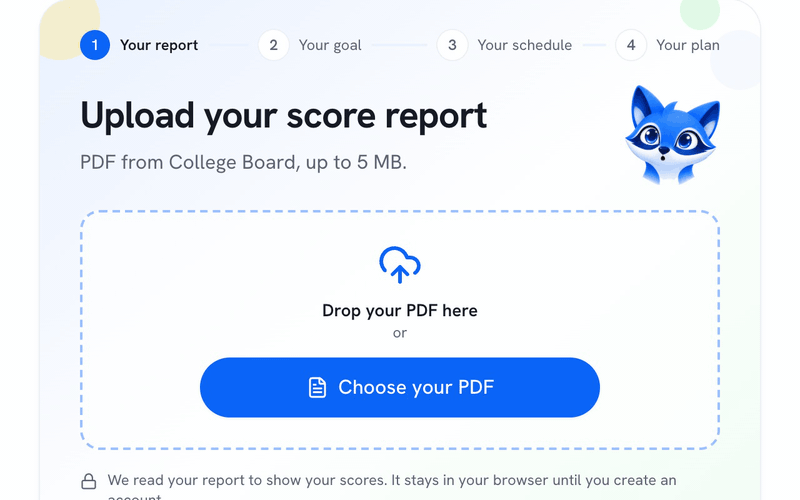
On the public score-report page a student uploads an SAT score report PDF; EduPark reads back the 1260 total, section scores, test date and eight skill-area ranges, takes a 1450 target and a March test date, and shows the plan at a glance: +190 points over 21 weeks at 10 hours a week, ready after a free sign-up.
New

Turn your SAT score report into a study plan

Upload your official SAT score report at edupark.ai/score-report, no account needed. EduPark reads back your scores and skill areas, asks for your target, test date and weekly hours, and builds your plan from the report, so you skip the placement test.

For students & families·

The Members page's Former students card lists a student who left, with the dates she joined and left; her read-only profile says it shows only work finished between those dates and its Sessions tab lists the two practice sessions she did as a member.
New

Find former students and the work they did with you

The Members page now has a Former students card, so you can look up a student whose access ended or who left. Open one to see their work from the dates they were a member. Bills also show when a billed student was later removed or left.

For educators & schools·

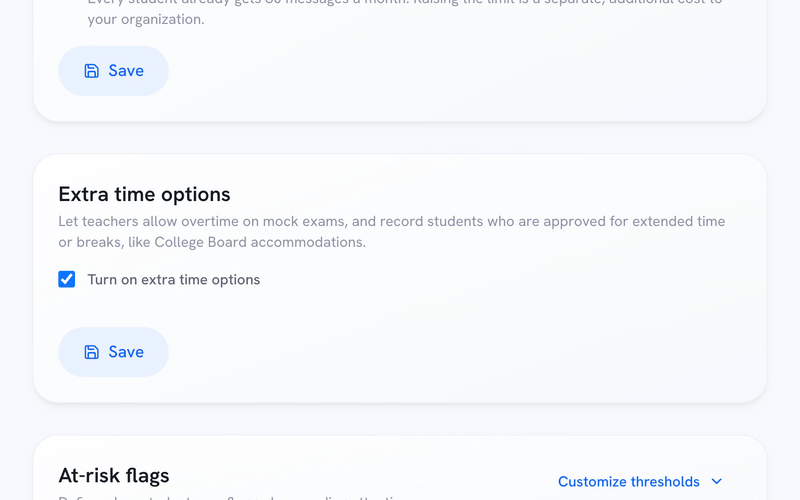
Org Settings shows Extra time options turned on; a student's profile shows her testing accommodation, time and one-half with longer breaks, set by her teacher, and its edit form offers standard, time and one-half or double time, all or chosen sections, longer breaks and breaks as needed.
New

Record extended-time accommodations for students

Turn on Extra time options in Org Settings, then record a student's approved accommodation on their profile: time and a half or double time for every section or chosen ones, plus longer breaks or breaks as needed. Their mock exams time themselves to match, you can set extra time for a group of students at once, and teachers can still allow overtime on top.

For educators & schools·

My reports shows a reported question marked Fixed, with its Received, Under review and Fixed timeline, what was changed and a note from the team; the student's notifications show the update and the earlier "We're looking into your report" notice.
New

Follow up on the questions you report

After you report a problem with a question, My reports shows where it stands and the question carries a You reported this marker. We let you know when our team starts looking into it, and again when we close it, with what we found and what we changed.

For students & families·

On the dashboard's Today card a study-plan row reads Transitions, Practice, 10 questions. The student taps it, answers two questions and leaves with Save & Exit; the same row now reads 2 of 10 answered, and tapping it reopens the set at question 3.
Improved

Your study plan picks up right where you left off

Start a practice set from your plan or dashboard, step away, and the same set reopens at the next question you haven't answered. Plan cards show each set's size and then your progress, like "2 of 10 answered". On a rest day, Start early now tells you what it opens before you tap.

For students & families·

On a practice-session summary showing 2 of 5 correct, the student opens Nova and asks which mistakes to fix first; Nova answers from that session's results, naming the missed questions and their topics.
Improved

Nova knows how you did on the page you're looking at

Open Nova on a practice summary, a mock exam score report or a class assignment, and it already has your results for that page. Ask which mistakes to fix first or what to practice next, and it answers from how you actually did. If your teacher is holding results, Nova keeps the answers held too.

For students & families·

A student with no study plan sees Scout's recommended practice on the dashboard beside a "See where your score is headed" invite; after a mock exam the report offers to turn the test into a study plan, which opens the plan setup.
Improved

Start practicing right away while you set up your study plan

Students without a study plan now see today's recommended practice on their dashboard, with an invite to build a plan next to it. After a mock exam, the report offers to turn your results into a study plan.

For students & families·

Also shipped

More issues